10.1-inch 14K
Monochrome LCD Screen
& Matching HDMI Driver Board
Build the display section of your resin 3D printer with a 10.1-inch 14K mono LCD and matching HDMI driver board options. Select the screen, board or both.
16.8 × 24.8 µm pixel pitch · 223.78 × 126.98 mm active area
LCD & driver board
Choose one or both.
- LCD screen
- 10.1-inch 14K · 13320 × 5120 · MIPI
- HDMI driver board
- HDMI input · Panel-specific configuration
Sold separately. Cable and power-supply options are confirmed with your quote.
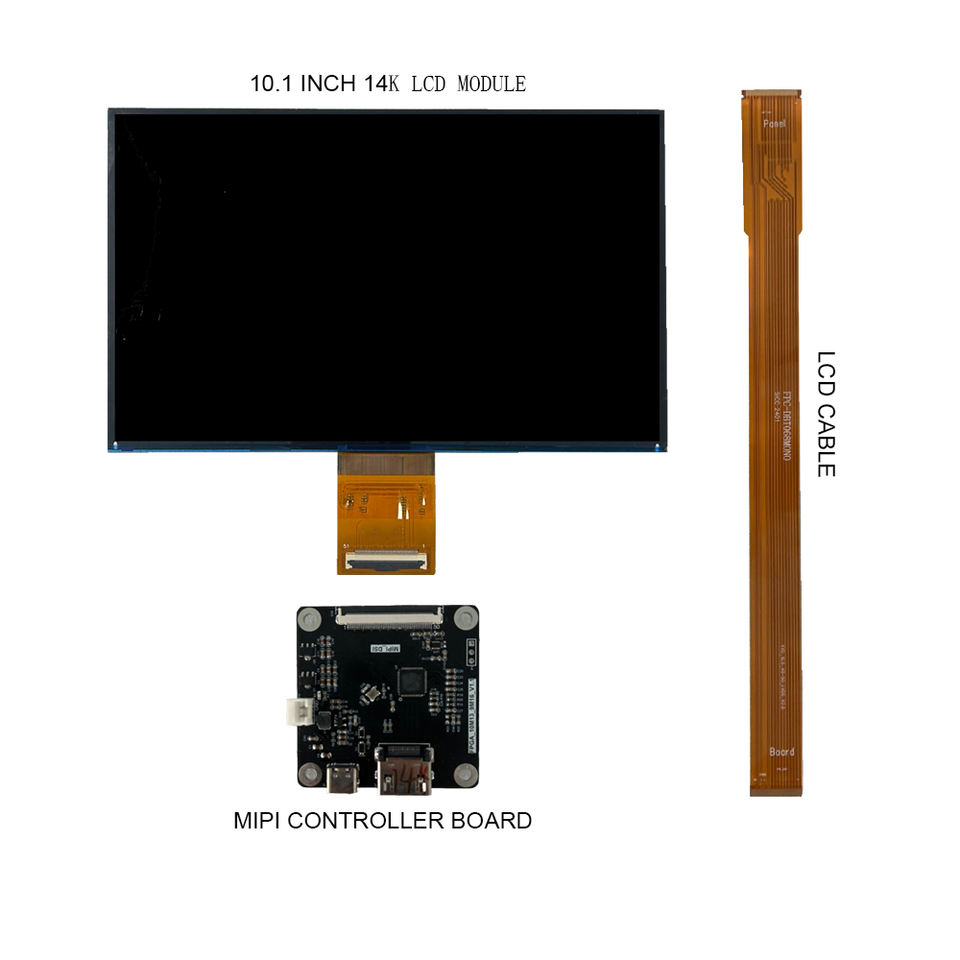
HDMI controller connection
Connect your host to the 14K panel through a matching HDMI-to-MIPI board.
- Host controllerHDMI output
- Driver boardHDMI to MIPI
- 10.1-inch LCD51-pin MIPI
Match the board firmware, display timing and cable to DBM101M14K01. Share your host or Raspberry Pi model and required output mode for configuration confirmation.
Check your controller configurationSpecifications
Display
| Material model | DBM101M14K01 |
|---|---|
| Screen size | 10.1 inch |
| Display type | Monochrome TFT LCD |
| Resolution | 13320 × 5120 pixels |
| Pixel pitch | 16.8 × 24.8 µm |
| Backlight | Not included |
Dimensions & interface
| Active area | 223.78 × 126.98 mm |
|---|---|
| Panel outline (W × H × T) | 230 × 142 × 1.06 mm |
| Panel interface | 8-lane MIPI · 51 pins |
| Ordering options | LCD / Driver board / Both |
Technical details & specification basis
Panel model: DBM101M14K01. Confirm the panel marking and revision before installation.
The panel uses two four-lane MIPI-DSI signal groups through a 51-pin connection. The data sheet lists a typical 1.8 V I/O supply and +5.5 V / −5.5 V analog rails. Use a correctly configured driver assembly and verify the pinout and power sequence with the supplier.
405 nm transmittance and contrast are marked TBD in the data sheet. No print-speed, exposure-time, service-life or finished-part accuracy guarantee is inferred from the 14K designation. The 230 × 142 × 1.06 mm dimensions describe the LCD outline; allow additional space for the cable and external board.
Integration
Check the panel dimensions, connector and controller configuration for your system.
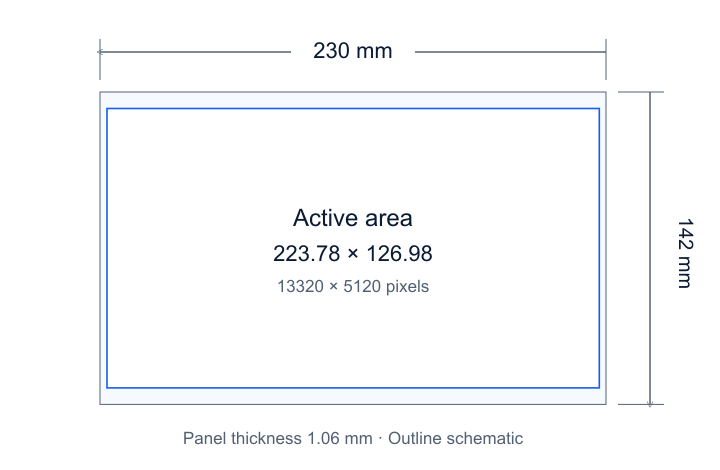
Mechanical fit
Allow space for the panel, external PCB and flexible cable. Compare the mounting opening and cable routing with your existing assembly.
51-pin MIPI connection
Verify the pin assignment, contact orientation and dual-channel signal arrangement. A matching pin count alone does not establish compatibility.
Board and host timing
The driver board must map your host signal to the panel’s required timing and monochrome image layout. Confirm the input mode and firmware before ordering.
FAQ
How should I handle and install the screen?
Follow your system’s assembly or service instructions for mounting, sealing and calibration.
- Disconnect power and keep the panel and connectors free of resin and debris.
- Open the connector latch before moving the cable. Avoid pulling or sharply bending the flexible circuit.
- Run the screen test, check image orientation, and configure exposure before printing.
Can I buy just the LCD?
Yes. Select LCD screen and leave Driver board unchecked. Your request will include the LCD only.
Can I buy just the driver board?
Yes. Select Driver board and uncheck LCD screen. Include your panel code and controller requirements so the board version can be confirmed.
Is the driver board included with the LCD?
The two components are selected separately. Add both if you need both; the inquiry lists their quantities individually.
Will this work in any 10.1-inch 14K printer?
Please send the exact panel code and printer model. Mechanical fit, connector pin assignment, board configuration and firmware must all match.
Are cables and a power supply included?
List the accessories you need in the inquiry. Cable, adapter and power-supply inclusion is confirmed for the selected board and configuration.
Does the LCD accept HDMI directly?
The LCD uses MIPI. HDMI input requires a driver board configured for this panel. Its accepted host resolution and image mapping must be confirmed; the 14K panel designation does not imply native 14K HDMI input.
Can I use a Raspberry Pi?
Share the exact Raspberry Pi model, operating system and intended output mode. Support depends on the matching HDMI driver board, its timing and firmware; direct connection to a Raspberry Pi DSI port is not established.
Building a resin 3D printer?
Tell us your mainboard or HDMI host, the LCD screen you need, and whether you want the screen, matching board or both. Include quantities so we can discuss your configuration before quotation.
Read the LCD and HDMI driver board guide →
Choose LCD & board options ↑